


ALO, WITHIN REACH
How to use ALO.
Your day has enough going on.
Using ALO can be the easy part.
Getting started, coming back or looking for an answer? Open just what you need. You can look around before buying, too.
Two places.
One thread.
The email brings the whole day.
My ALO helps you pick it up again.
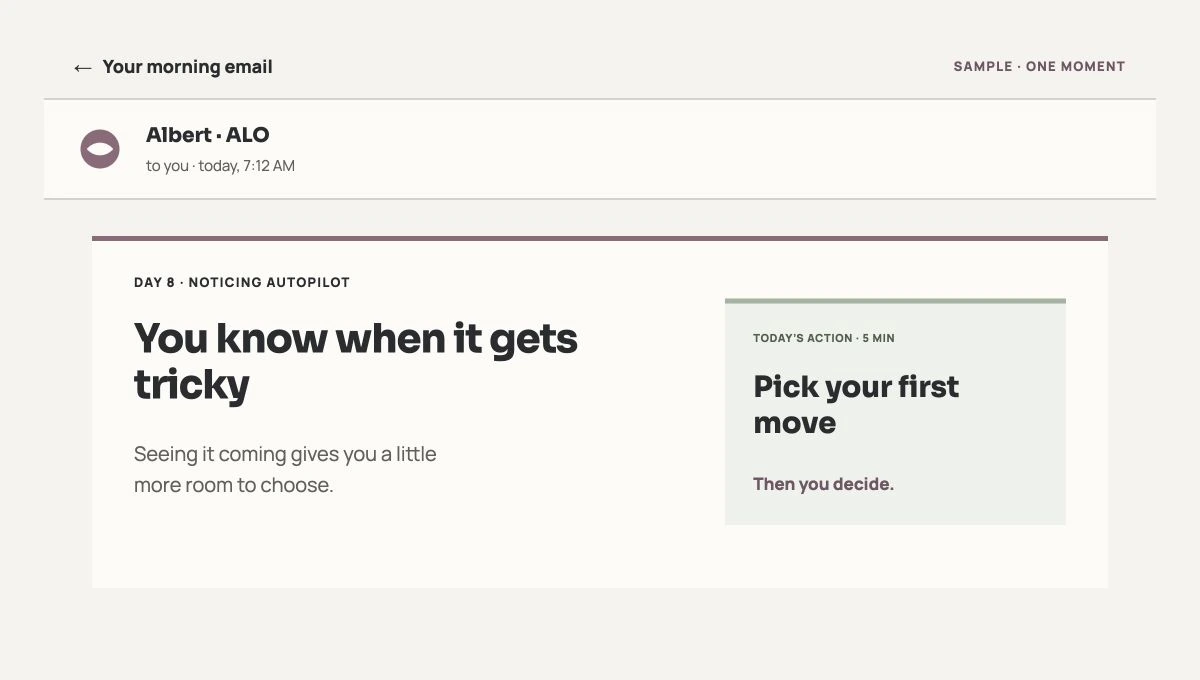
Read. Try one thing.
The action is in the message. You don’t have to open My ALO to find the other half.

Come back when it helps.
TODAY offers an action for your scene. “Fit to my day” lets you adjust it to how you’re doing. It may differ from the email’s action; choose whichever helps. It’s optional.
You can enlarge the images. These are illustrative samples with no participant data; the email is not a screenshot of someone’s inbox.
01 / FIND YOUR WAY
Getting started.
Just enough to know where to go.
I have ALO 21. What do I do first?
- Open your welcome email and access My ALO through the account that holds your purchase or gift.
- Set up Day 0: choose your start date and email time. You can leave the personalization questions unanswered.
- When Day 1 arrives, read the email and try one action. You’re already using ALO.
There’s no app to install.
I have ALO 7. Will I get an email every day too?
No. ALO7 is the digital experience of Abre los ojos: the book, a notebook with seven optional prompts and a short written conversation with Albert. Open the private link from your purchase or sign in to your account.
Continue picks up your reading. You can use the index in any order; the seven prompts are optional and have no deadline.
The revised book and its full audiobook are available in Spanish, Catalan and English. You can listen from the book reader. You also keep access to the previous edition and its notes. You can listen free to the new prologue and first chapter in Spanish · 5:54.
ALO7 includes its own short written conversation with Albert for 30 days from first opening, with replies within three working days. General or technical questions through Contact use a separate channel; they do not extend that conversation or turn it into daily support.
I bought ALO or received a gift, but I can’t get in.
Use the email address from your purchase. If you received a gift, claim it with your own account first. If you haven’t set a password or can’t remember it, use password recovery in My account.
If your access still doesn’t appear, write to us from that email address. You don’t need to buy again. Don’t send passwords or private links.
02 / IN YOUR INBOX
An email arrives.
Now what?
A scene, a way to look at it and something to try.
Do I have to read, listen, sign in and reply every day?
No. Read the email and try the action when that scene comes around. You can follow ALO 21 through email alone. Opening My ALO, logging the day or replying is up to you.
The email contains the complete suggestion in writing. If your edition includes audio, you will find it in My ALO. The full audiobook of Abre los ojos, included in ALO21, opens from the book reader in Spanish, Catalan and English.
I can’t find my welcome email or today’s email.
- Search for “ALO” in spam and promotions in the inbox linked to your access.
- Check that you’ve finished Day 0, your start date has arrived and messages aren’t paused.
- While we sort it out, TODAY offers an action for your scene. Open My ALO from your account. If the email is still missing, let us know.
ALO 7 doesn’t include this daily series.
Can I reply to the email? Who answers, and where?
Yes. Albert reads what you choose to send. One scene is enough: “After dinner I want to smoke, and I end up going out to buy.” You don’t have to tell your whole story.
If you reply by email, the conversation stays in email. If you write in My ALO’s Help section, you read the reply there; it isn’t automatically forwarded to your inbox.
If you open Contact from miALO or your account, the form uses your account email and the conversation continues by email. It does not create a reply history in miALO or attach your private notes.
With ALO 21, you get a reply within one business day during the published working hours. You can close the tab; it’s not a live chat.
Can I pause the emails without losing what I’ve saved?
In Help → Pause messages, you stop scheduled sends without closing My ALO or deleting what you’ve saved. Use Restart messages there while your program is still active.
This pauses emails, not the program calendar. Reactivating them resumes future sends; it doesn’t send all the missed days at once.
03 / YOUR SPACE
My ALO.
No homework.
A place to keep the thread. Nobody’s taking attendance.
What’s in each part of My ALO?
- TODAY: a short reading and an action for your scene; you can adjust it to how you’re doing.
- My month: the days you’ve reached and what you chose to save.
- Clues: actions for a specific situation.
- SOS: one short action for when the urge gets strong.
- Help: write, read replies and manage messages.
For more detail, open the manual from Help in My ALO.
Do I have to fill everything in? What does a blank day mean?
Entries and personalization are optional. A gap means “not recorded”: it doesn’t mean you smoked or did nothing.
The program day, what you log and the use you report are different things. Reading the email and getting on with your life is using ALO too.
Is what I write saved? Can I see it on another device?
In My ALO, submit the entry and wait for confirmation. Saved entries stay in your account; half-written text isn’t a submitted entry. If you see an error, don’t assume the latest change was saved.
In ALO 7, notes and your map stay in that browser on that device when you choose to save them. Export them before switching devices or clearing browser data: they don’t sync with your account.
The audio won’t start, or I can’t listen right now.
Open the book reader. Choose a section and press play: audio does not start automatically. If it is silent, check the volume and connection, then open it again. You can keep reading in the meantime.
If it keeps failing, tell us which audio it was, what device you’re using and what you see on screen. You don’t need to repeat the whole program.
The day looks wrong, or Day 1 hasn’t appeared yet.
Before your start date, you’ll see the waiting screen for Day 1. After that, the program follows the date and time zone you set.
If they don’t match, tell us which day you see and which one you expected. Don’t set up Day 0 again just to try to fix the counter.
04 / LIFE HAPPENS
You can
come back.
With a question, a rough day or something to say.
I’ve been away for a few days. Do I have to catch up?
There’s no pile of homework waiting. Return to today’s email or open TODAY to find an action for your scene. My month keeps what you saved; you don’t have to fill the gaps.
In ALO 7, Continue takes you back to where you stopped reading on that device.
I smoked today. Do I have to start from zero?
The program doesn’t restart or erase the earlier days. You can log it or leave it unrecorded. Go back to the scene that got tricky and find one step you can try next time.
If you need to talk about it, reply to the email or open Help. No apology needed.
Should I open SOS, find a Clue or write to Albert?
SOS gives you a little room when the urge gets strong. Open Clues to find an action for your situation. Help lets you talk it through in writing, with a human reply within the published response time.
SOS doesn’t contact emergency services. If you can’t stay safe or need urgent or clinical care, find appropriate help.
Does Albert see my notes? Can I delete what I’ve shared?
Albert receives what you send by email or through Help; your other notes and entries don’t automatically reach his inbox. In ALO 7, you review which part of your map you share before sending it.
In Help, you can withdraw optional permissions; data saved for that purpose is deleted, and general ALO remains available. To access, export or delete your data, use the channel in the privacy policy.
Why are there 30 days if ALO is a 21-day trial?
It’s 21 days for the break, then 9 to sort through what you noticed. From days 22 to 30, you look at what helped and how you want to continue. You don’t have to decide the rest of your life.
Emails and support end after day 30. You can view and save your map during the stated access period. There’s no automatic renewal.